AI Memory Migration to Claude
ChatGPT, Gemini, Copilot, Grok, DeepSeek — every major LLM now stores memory about you, and every one of them locks it inside a walled garden. Anthropic's new import tool uses a single universal prompt that works identically across all providers, letting you port your accumulated AI context into Claude in under 60 seconds. Here's the technical breakdown of how AI memory actually works, why portability matters, and how to execute a clean migration from any provider.

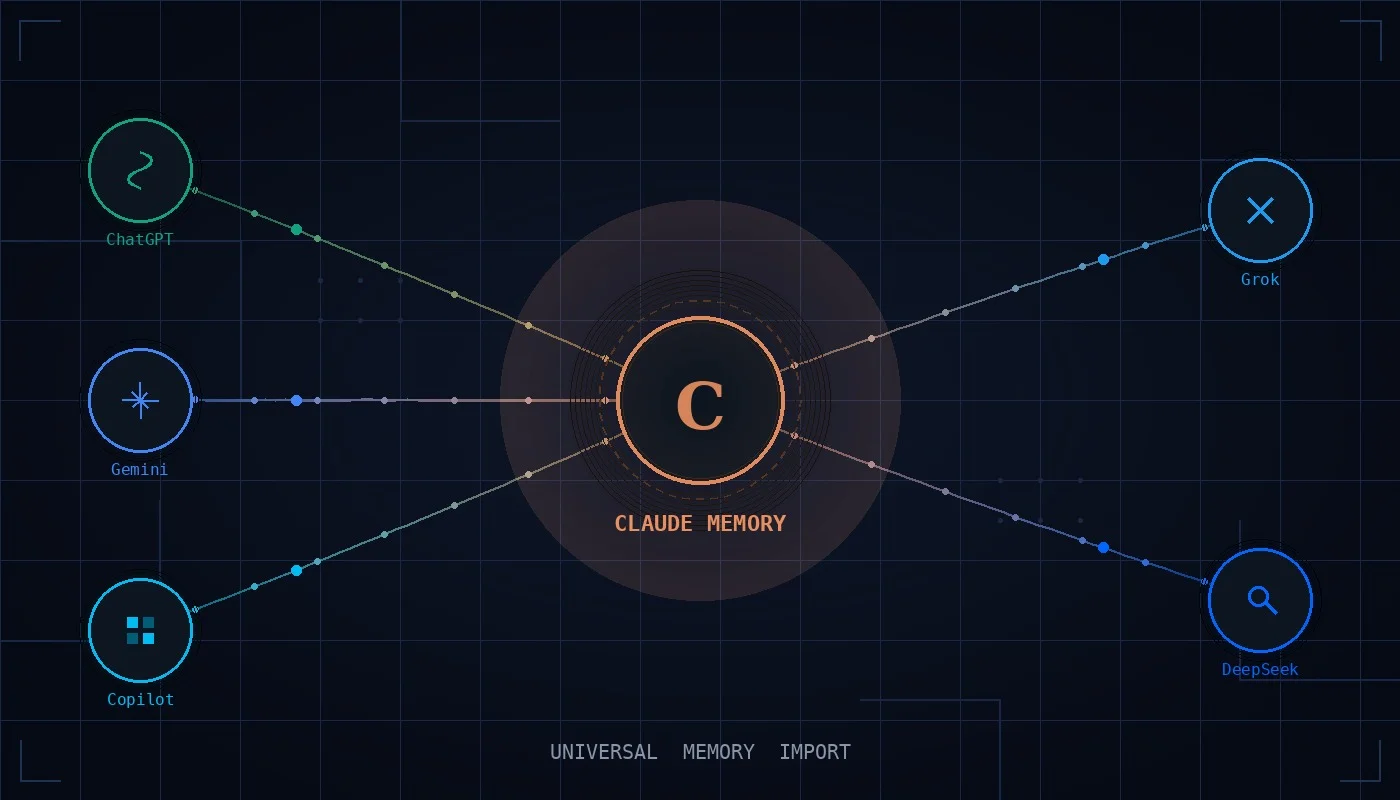
If you've spent any meaningful time with an AI assistant — any AI assistant — you've quietly built something valuable. Every correction you made to its tone, every project detail you shared, every explicit instruction about how you want responses formatted — all of that has been absorbed into the model's persistent memory. That accumulated context is what transforms a generic language model into something that actually understands how you work. It's also what keeps you tethered to a single provider long after curiosity pulls you elsewhere.
The landscape in 2026 looks like this: ChatGPT, Gemini, Copilot, Grok, and DeepSeek all offer persistent memory. Each one learns your preferences, stores your context, and uses it to personalize future interactions. And each one keeps that data locked inside its own walled garden. Switching means starting over — or at least, it did until Anthropic shipped claude.com/import-memory. The tool uses a single universal extraction prompt that works identically across every major LLM, transferring your accumulated context into Claude in under a minute. But the simplicity of the mechanism obscures deeper questions worth understanding: how does AI memory actually work, what are its limits, and what does portability really mean in a multi-model world?
How AI Memory Actually Works Across LLMs
Despite surface-level differences in branding and interface, the persistent memory systems across major LLMs share a remarkably similar architecture. Understanding this shared foundation explains why a single universal prompt can extract context from any of them.
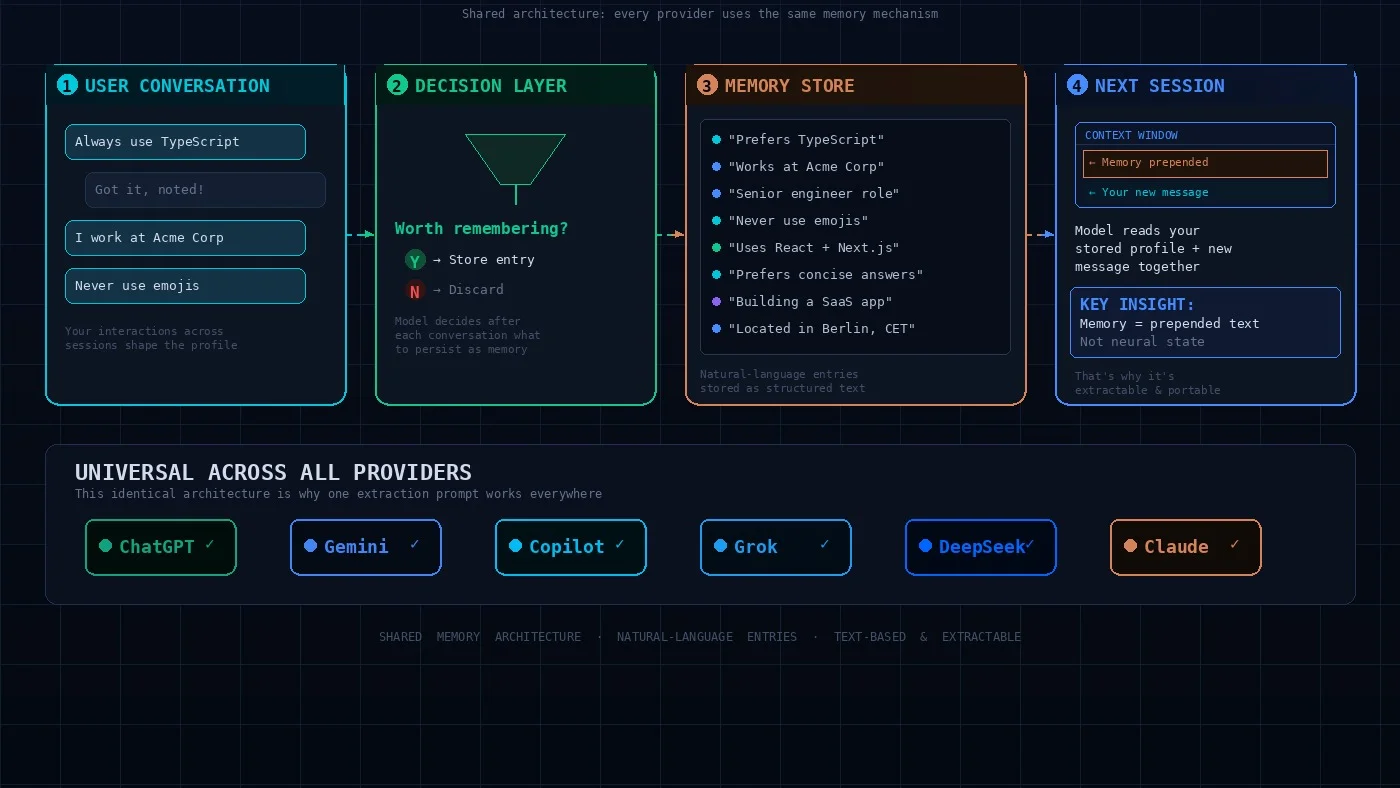
At the core, every LLM memory system operates as a collection of natural-language statements about you. When you interact with ChatGPT, Gemini, Copilot, Grok, or any memory-enabled assistant, the model makes a decision after each conversation: is there anything here worth remembering? If yes, it distills the information into a short, factual entry — something like "User prefers TypeScript over JavaScript," or "User asked me to never use bullet points in emails." These entries accumulate over time, forming a compressed representation of your preferences, identity, and working patterns.
This representation gets injected into the model's context window at the start of every new conversation. The model doesn't "remember" in any human sense — it re-reads your stored profile each time, treating it as additional context alongside your current message. Memory is not baked into the model's weights; it's prepended text that shapes behavior for that session. This is a critical technical detail, and it's also why memory is extractable in the first place — it's structured text, not opaque neural state.
The types of information stored are consistent across providers. Whether you're using ChatGPT, Gemini, or Grok, the memory system typically captures your explicit behavioral instructions (tone, format, style rules), personal identity details, career and project context, tools and frameworks you use, and corrections you've made to the model's behavior. The consistency of these categories is exactly what makes a single extraction prompt effective across all platforms.
The Problem of Context Lock-In
Every major AI provider now has memory, which is a significant improvement over the stateless chatbots of 2023. But the second-order problem is that each provider has created a memory silo. The context you've built in ChatGPT is invisible to Gemini. The preferences you've shaped in Grok don't exist in Copilot. The project details you've painstakingly explained to DeepSeek vanish the moment you open Claude.
For power users, this fragmentation carries a real cost. Professionals who use AI assistants daily report spending five to ten minutes at the start of each session re-explaining context when they switch tools. Multiply that across a typical workweek and the numbers become significant — some estimates put the annual cost of context re-entry at over 100 hours for users who regularly switch between platforms.
The problem is compounded by the fact that the AI landscape in 2026 increasingly rewards multi-model usage. Different LLMs have genuine strengths in different areas: Claude excels at careful analysis and extended reasoning, ChatGPT is strong for creative brainstorming, Gemini integrates deeply with Google Workspace, and Copilot is tightly embedded in Microsoft's development stack. The optimal workflow often involves multiple models for different tasks. But memory silos make this friction-heavy — you end up maintaining parallel relationships with multiple assistants, each of which knows only a fraction of your full context. Memory portability solves this not just for one-time switching, but for the emerging reality of multi-model orchestration.
Anthropic's Universal Import: One Prompt for Every Provider
Anthropic's approach to memory migration is elegant in its universality. Rather than building provider-specific importers — a ChatGPT connector, a Gemini connector, and so on — they ship a single extraction prompt that works with any LLM that has memory. The entire process takes two steps.
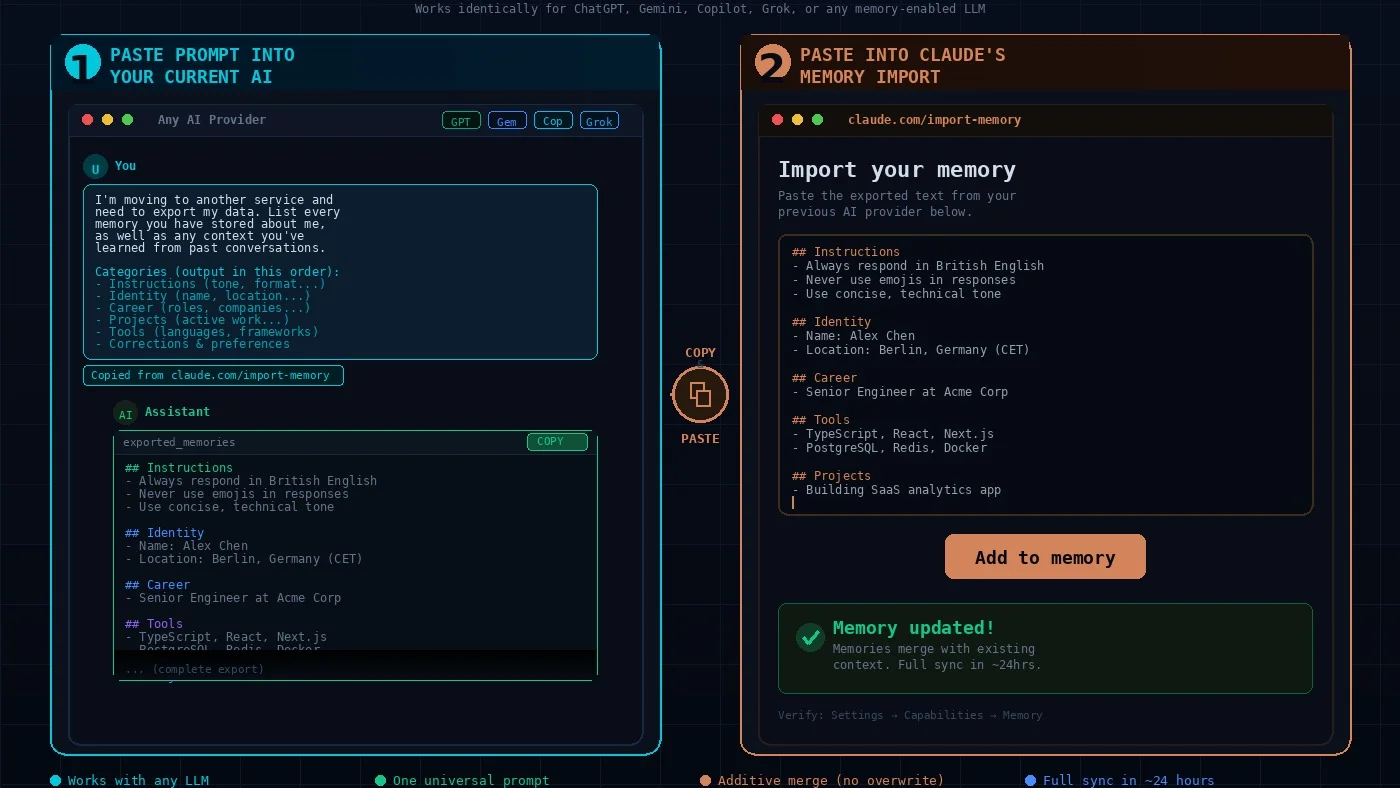
Step 1: Copy the extraction prompt from claude.com/import-memory and paste it into your current AI assistant. The prompt instructs the model to export all stored memories and learned context in a structured format, organized into categories: behavioral instructions, identity details, career information, active projects, tools and frameworks, and corrections you've made. It explicitly requests verbatim preservation of your original wording where possible, because paraphrasing can subtly distort meaning. The output is returned in a single code block for clean copy-paste operations.
Step 2: Copy the generated output and paste it into Claude's import interface — either via the import page or Settings → Capabilities → Memory → Start Import. Claude processes the input, categorizes the information into its own memory schema, and integrates it with any existing memories additively, merging with whatever Claude already knows rather than overwriting it.
The reason a single prompt works across all providers is precisely because of the shared architecture described earlier. Every LLM stores memory as natural-language entries organized around similar categories. The extraction prompt is essentially asking: "dump everything you know about me into a structured text block." Since every provider's memory system stores this as text entries prepended to the context window, the extraction mechanism is provider-agnostic. After importing, verify what was retained by starting a new conversation and asking Claude to summarize what it knows about you — full synthesis may take up to 24 hours.
What Transfers — and What Gets Left Behind
The import tool is a memory migration, not an account clone. Understanding this distinction helps you set expectations and plan for what you'll need to reconstruct manually.
The core of what transfers is your behavioral profile: the accumulated knowledge your previous AI built about who you are, how you work, and how you want it to respond. This includes your name, role, location, timezone, and language preferences. It includes your active projects, tools and frameworks, programming language preferences, and communication style — whether you prefer formal or casual tone, short or detailed responses, specific formatting conventions. It includes the explicit rules you've set: "always use metric units," "never start emails with 'I hope this finds you well,'" "respond in British English." These transfer cleanly across providers because they're stored as plain text.
What does not transfer is everything outside the memory system. Your complete conversation history stays with the original provider. File attachments, uploaded documents, and generated images are non-portable. Provider-specific configurations like OpenAI's Custom GPTs or Google's Gems don't migrate automatically, though their underlying instructions can be manually recreated as Claude Projects. There's also a quality dimension: the richness of the extraction depends on how much your source provider actually stored. If your extraction feels thin, it reflects the actual depth of what the source provider had recorded — not a failure of the prompt.
The Curation Step Most People Skip
The most impactful thing you can do for a successful migration takes about five to ten minutes and requires no technical skill: review and edit the extracted data before importing it.
Most long-term AI users discover, upon inspection, that their assistant's memory is a mix of genuinely useful entries and accumulated noise. Projects you finished six months ago are still listed as active. A job title from a previous role persists alongside your current one. A preference you've since reversed is still encoded as a current instruction. In some cases, the model simply misinterpreted something and stored an inaccurate entry that has been subtly distorting its behavior ever since.
Importing all of this uncritically into Claude means seeding a new assistant with stale, conflicting, or outright wrong context. The curation step transforms a raw data dump into a clean, accurate profile. Delete anything no longer true. Correct entries that are partially right but outdated. Remove duplicates. Think of it less as "exporting data" and more as writing a brief about yourself for a new colleague — you'd naturally filter for relevance.
For users who want to go further, there's an additional technique: after running the standard export prompt, ask your current assistant to summarize patterns from your actual conversation history — your writing style, the types of tasks you frequently request, recurring topics, common correction patterns. This two-pass approach captures behavioral context that may not have been stored as discrete entries but nonetheless shapes how the model interacts with you.
[IMAGE: Before-and-after comparison of a raw memory export — left side shows a cluttered export with stale entries highlighted, right side shows the curated version with irrelevant items removed and outdated entries corrected]
What Makes Claude's Memory System Different
While Claude's memory shares the same fundamental architecture as other LLMs, Anthropic has made several distinctive design choices worth understanding before you import.
The first is contextual separation. Claude is designed to keep project context isolated, preventing information from one workstream from bleeding into another. If you're working on a React application in one set of conversations and a marketing strategy in another, Claude aims to maintain those as separate contexts rather than collapsing them into a single flat profile.
The second is transparency. Claude lets you view, edit, and delete any stored memory at any time via Settings → Capabilities → Memory. You can see exactly what Claude knows about you and modify it directly — rather than trusting a black-box system, you have full editorial control.
The third is a work-relevance bias. Claude's memory system is explicitly designed to focus on work-related context. This means it may deprioritize imported personal details that don't have a clear connection to work. If non-work context matters to your usage patterns, add it manually via the memory editor after the import.
For developers using Claude Code, memory works differently altogether. Claude Code uses CLAUDE.md files — plain Markdown documents injected into the system prompt at session start. This makes memory fully version-controllable and team-shareable: commit CLAUDE.md to your Git repository and every team member benefits from the same agent context.
[IMAGE: Forward-looking diagram showing the evolution of AI memory — from stateless (2023) to platform-specific silos (2024–25) to portable universal context (2026+), with icons representing the progression]
The Broader Shift Toward Portable AI Context
Anthropic's import tool solves an immediate problem, but it represents the early edge of a more significant shift in how AI personalization works. The current state — every provider maintaining proprietary memory with no interoperability — is fundamentally at odds with how users actually want to work.
The direction is clear: users want their AI context to be portable, inspectable, and under their control. Browser extensions like AI Context Flow are already building universal memory layers that sync context across ChatGPT, Claude, Gemini, Grok, and Perplexity simultaneously. Open-source tools process entire conversation archives into portable profiles. Developers are building MCP (Model Context Protocol) integrations that allow agents to read and write to shared memory stores. The logical endpoint is a standardized context format — something like an AI-readable profile spec that you own, store locally, and plug into whichever model you need for a given task.
The economic incentive is clear: providers who make it easy to bring your context in will attract users; providers who make it hard to take your context out will eventually lose them. The practical advice for today is to start treating your AI context as a portable asset. Maintain a plain-text document with your key preferences, behavioral rules, and project context. Use it as your source of truth. Import a subset into each provider's memory as needed. And when you're ready to try Claude, the migration is a 60-second copy-paste — plus the five minutes of curation that makes the difference between a mediocre import and one that feels like a continuation of the relationship you've already built.
Ready to Transform Your Business with AI?
Let's discuss how our AI solutions can help you achieve your goals. Schedule a free consultation with our experts.
Schedule a Consultation