The Developer's Guide to Claude Code: Mastering Skills, Hooks, and Tools
Claude Code is more than a smart terminal assistant — it's an extensible development platform. Learn how Skills inject knowledge, Hooks enforce rules deterministically, and MCP Tools connect Claude to GitHub, databases, and hundreds of external services. This guide breaks down all three pillars with practical examples and a decision framework to help you build a truly customized AI coding workflow.

Why Extensibility Is the Real Superpower of Claude Code
Claude Code has rapidly become one of the most capable AI coding assistants you can run in a terminal. It writes code, debugs issues, navigates codebases, and executes commands — all through natural language. But the developers getting the most out of it aren't just writing better prompts. They're building better environments for the AI to work in.
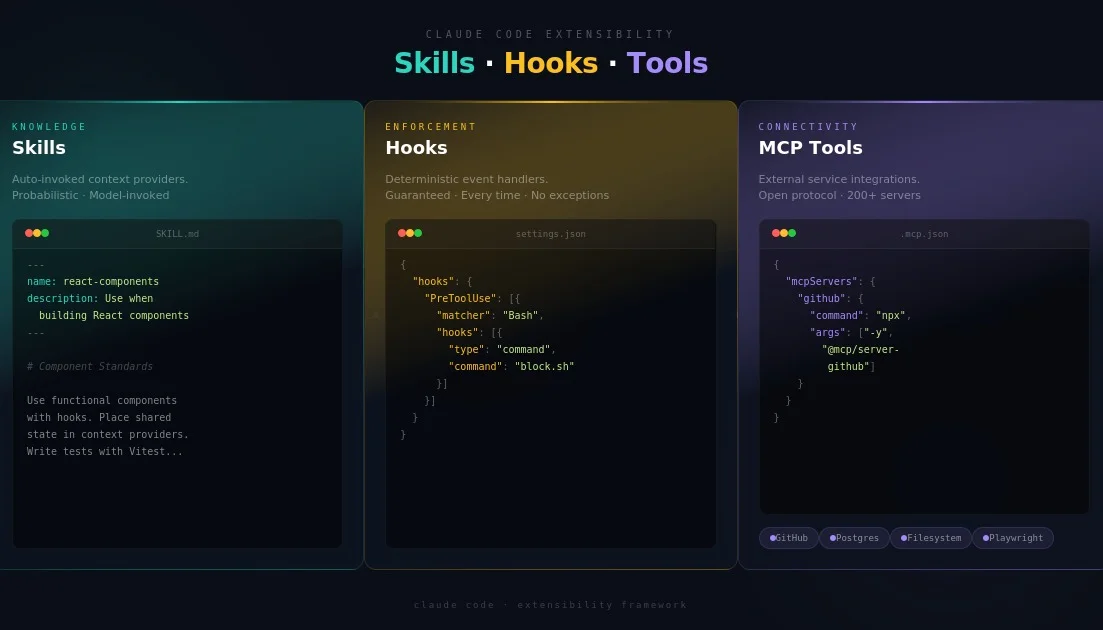
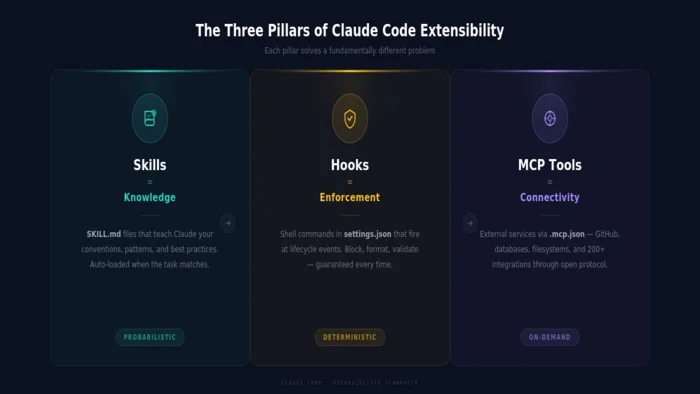
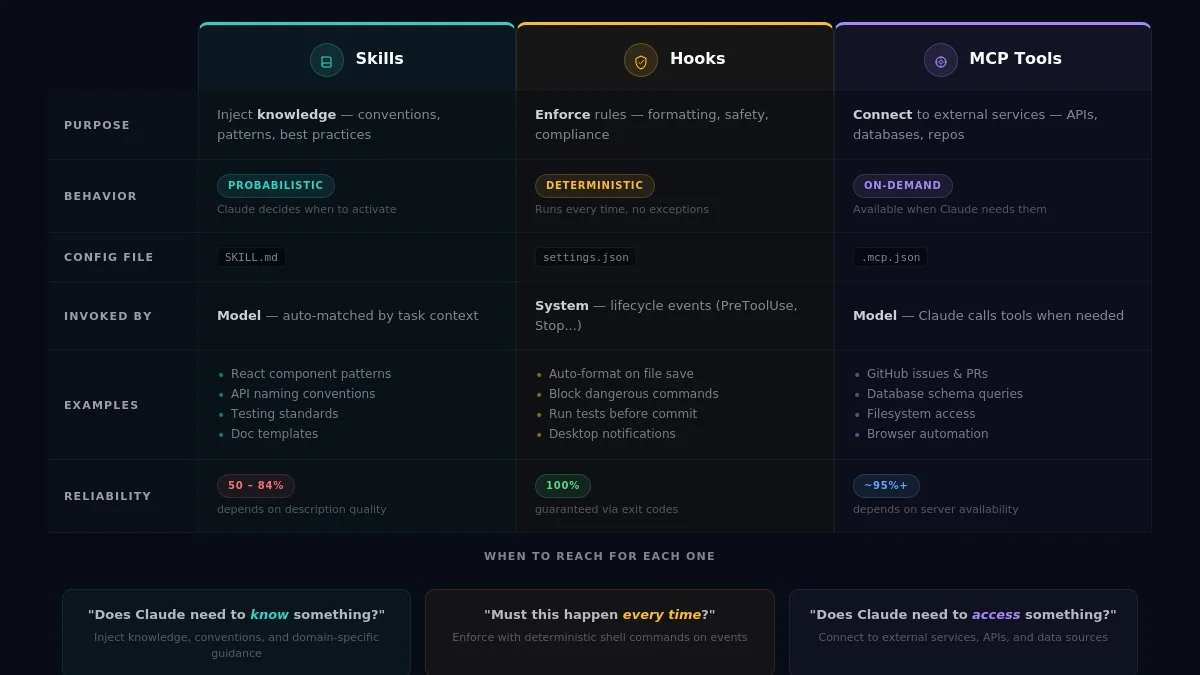
That's where Claude Code's extensibility system comes in. Three features form the backbone of customization: Skills, Hooks, and Tools (via MCP servers). Each solves a fundamentally different problem, and understanding when to reach for each one will transform how you work with AI-assisted development. Skills give Claude knowledge. Hooks give you enforcement. Tools give Claude access to the outside world. Together, they turn a general-purpose assistant into a deeply personalized development partner.
Skills: Teaching Claude Your Playbook
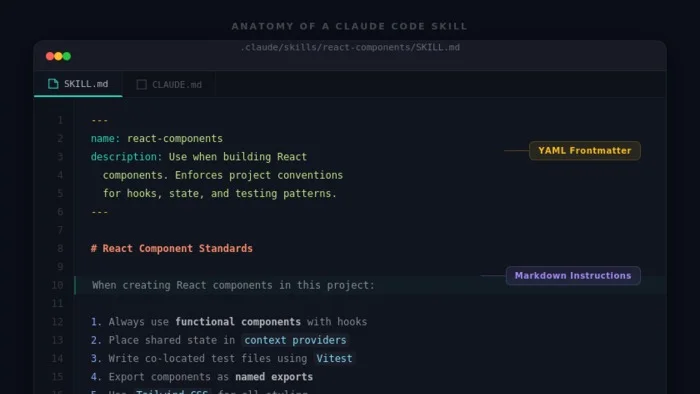
Think of Skills as reusable knowledge packs. They're markdown files (named SKILL.md) that contain instructions, best practices, templates, and domain-specific guidance. When you give Claude Code a task, it reviews the descriptions of all available skills. If a skill's description matches the current context, Claude loads the full instructions and applies them automatically.
This means skills are model-invoked — Claude decides on its own when to activate them based on what you're working on. You don't trigger them manually. Each skill lives in a simple folder structure with a YAML frontmatter block containing a name and description, followed by the actual instructions in markdown. For example, a React component skill might describe your team's conventions for hooks, state management, and test file placement. When Claude detects you're building a React component, it pulls in those instructions and follows them.
Skills can be installed at two levels. Personal skills live in ~/.claude/skills/ and are available to you across every project — great for your preferred coding patterns. Project skills live in .claude/skills/ and are shared with your entire team through version control, making them ideal for enforcing project-specific conventions. In December 2025, Anthropic released the Agent Skills specification as an open standard, and OpenAI adopted the same format for Codex CLI, which means skills you write for Claude Code are increasingly portable across tools.
Here's the critical nuance most developers miss: skills are probabilistic, not deterministic. Claude uses judgment about whether to invoke a skill. If it's deep in a complex, multi-step task, it might skip a relevant skill entirely. Community testing has shown activation rates ranging from roughly 50% to 84%, depending on how well the skill description matches the task context. Some developers have found success using hooks to force skill evaluation before Claude begins implementation, creating a two-step process where Claude first checks available skills, then proceeds with the task. If you absolutely need a rule followed every time, skills alone won't cut it — that's where hooks come in.
Practical skill ideas include code style guides that enforce naming conventions, framework-specific knowledge packs for tools like SvelteKit or Django, documentation templates for READMEs and changelogs, and review checklists covering security, accessibility, or performance requirements.
Hooks: The Deterministic Enforcer
If skills are suggestions, hooks are guarantees. A hook is a script or command that runs automatically at a specific point in Claude Code's workflow. It doesn't ask Claude to do something — it does it. Every single time, with zero exceptions. This is the fundamental distinction that drives every architecture decision when working with Claude Code extensibility.
Consider a concrete example: you add a rule to your CLAUDE.md file saying "never run rm -rf." In practice, Claude follows that instruction about 70% of the time. Now add a PreToolUse hook that inspects every bash command and exits with code 2 when it detects the dangerous pattern. That command is blocked 100% of the time. For safety rules, formatting standards, and compliance requirements, the gap between "usually" and "always" is everything.
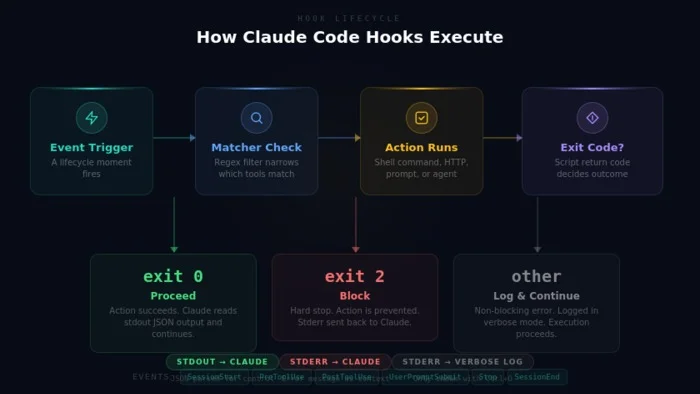
Hooks are configured in your settings.json file — either .claude/settings.json for project-level hooks or ~/.claude/settings.json for global ones. Each hook has three components: an Event (the lifecycle moment when it fires), a Matcher (an optional regex filter narrowing which tools trigger it), and an Action (the shell command, HTTP request, prompt, or agent that executes). Claude Code exposes a rich set of lifecycle events including SessionStart for injecting project context at startup, PreToolUse for blocking dangerous commands before execution, PostToolUse for auto-formatting or linting after edits, UserPromptSubmit for validating or enhancing prompts, and Stop for running tests or sending notifications when Claude finishes.
The exit code from your hook script controls what happens next. Exit code 0 means success — proceed normally. Exit code 2 is the critical one — it's a blocking error that stops the action unconditionally. Any other exit code is a non-blocking error that gets logged but doesn't halt execution. Beyond simple exit codes, hooks can also return structured JSON output for finer-grained control, including the ability to escalate decisions to the user.
Claude Code supports four hook types: Command hooks that run shell scripts (the simplest and most common), HTTP hooks that send POST requests to external endpoints, Prompt hooks that send a question to a Claude model for a yes/no evaluation, and Agent hooks that spawn a subagent with file-reading tools to verify conditions. Each type is suited to different complexity levels, from a one-line formatting command to a multi-step code review agent.
Three hooks every project should start with: auto-format on PostToolUse to keep code clean after every edit, dangerous command blocking on PreToolUse to prevent destructive operations, and desktop notifications on Stop so you know when Claude finishes a long-running task. These three cover the most ground for the least effort and deliver immediate, tangible value.
Tools via MCP: Connecting Claude to the Outside World
The Model Context Protocol (MCP) is an open standard that connects Claude Code to external tools and data sources. Think of it as a universal adapter — MCP servers give Claude access to GitHub, databases, file systems, web search, browser automation, and hundreds of other services through a standardized protocol.
The architecture is straightforward: you connect an MCP server, and Claude gets access to whatever tools that server exposes. Claude Code acts as the MCP client, consuming capabilities from one or more servers. Adding a server is as simple as running a command like claude mcp add github -- npx -y @modelcontextprotocol/server-github, after which Claude can list issues, create pull requests, search code, and perform other GitHub operations directly from your terminal session.
MCP servers can be configured at three scopes. Local (the default) makes a server available only to you in the current project. Project scope stores the configuration in a .mcp.json file at your project root, designed to be checked into version control so your entire team shares the same tool access. User scope makes a server available across all your projects globally. The ecosystem has grown rapidly, with popular servers covering GitHub, PostgreSQL, SQLite, Playwright for browser testing, filesystem access, sequential thinking for structured reasoning, and Context7 for up-to-date library documentation.
One elegant feature is MCP Tool Search. When you have many servers configured, all those tool definitions can eat up your context window. Claude Code handles this automatically — when tool descriptions would consume more than 10% of the context, tools are loaded on-demand instead of all at once. Claude searches for the right tool only when it actually needs one, keeping your working context clean and efficient. Claude Code can even run as an MCP server itself using claude mcp serve, allowing other AI tools like Cursor or Windsurf to delegate work to it. It's a fascinating pattern for agent orchestration — AI tools calling other AI tools.
Setting up your first server is quick. Drop a .mcp.json file at your project root with the server configuration, or use the CLI to add servers interactively. For remote HTTP-based servers, a single command with a URL is all you need. The important thing is to start simple and expand as you discover what Claude needs access to in your specific workflow.
The Decision Framework: When to Use What
Knowing which extensibility mechanism to reach for is half the battle. Here's a simple mental model that captures the core distinction:
Does Claude need to know something? Use a Skill. Inject knowledge, best practices, and domain-specific instructions that Claude can apply when relevant.
Does something need to happen every single time? Use a Hook. Enforce it with deterministic execution that doesn't depend on Claude's judgment.
Does Claude need to access something external? Use an MCP Tool. Connect it to the services, databases, and APIs your project depends on.
Another way to frame it: CLAUDE.md provides project memory, Skills provide routines and specialized knowledge, Hooks provide guarantees and enforcement, and MCP Tools provide external capabilities. The first two — CLAUDE.md and Hooks — are deterministic (they always run). The latter two — Skills and subagents — are probabilistic (Claude uses judgment). This distinction should drive every architecture decision you make.
A worked example brings it all together. Imagine you're building a Node.js API. You'd create a Skill describing your API conventions — route naming, error handling, authentication patterns, test structure. You'd add a PreToolUse Hook that blocks npm install of unapproved packages. A PostToolUse Hook runs ESLint and Prettier after every file change. A GitHub MCP server lets Claude search your issue tracker and reference relevant issues in commits. A PostgreSQL MCP server gives Claude read access to your dev database schema for writing accurate queries. Together, these create an environment where Claude has the right knowledge, can't do things it shouldn't, and can interact with everything your project needs.
Getting Started: A Three-Week Roadmap
If you're new to Claude Code extensibility, here's a practical path that builds incrementally without overwhelming you.
Week 1 — start with knowledge. Create a CLAUDE.md file describing your project structure, conventions, and preferences. Add one or two project-level skills for your most common patterns. This alone will noticeably improve the quality and consistency of Claude's output.
Week 2 — add enforcement. Set up your first hooks. Auto-formatting on PostToolUse and dangerous command blocking on PreToolUse deliver the most value with minimal configuration. You'll immediately notice fewer formatting inconsistencies in diffs and more confidence in what Claude is allowed to execute.
Week 3 — connect to the world. Add your first MCP server. GitHub or filesystem servers are the easiest to configure and provide the most obvious benefit. Once you see Claude pulling issue context or reading project files through MCP, you'll start imagining all the other integrations that would help your workflow.
From there, iterate continuously. Watch where Claude makes mistakes, misses conventions, or lacks context, then add a skill, hook, or tool to address that specific gap. The best setups aren't designed upfront — they're built incrementally through real usage, one improvement at a time.
The developers getting the most from Claude Code are the ones who treat it not as a chatbot, but as a junior developer who needs a well-configured environment, clear rules, and the right access to do great work. Skills, Hooks, and Tools are how you build that environment.
Ready to Transform Your Business with AI?
Let's discuss how our AI solutions can help you achieve your goals. Schedule a free consultation with our experts.
Schedule a Consultation